
CleanerPlus
Tidal TechTools
3.714.00 Reviews
- Version
- 1.1.0
- Installs
- 100.00K
- Age Rating
- Everyone
Screenshots
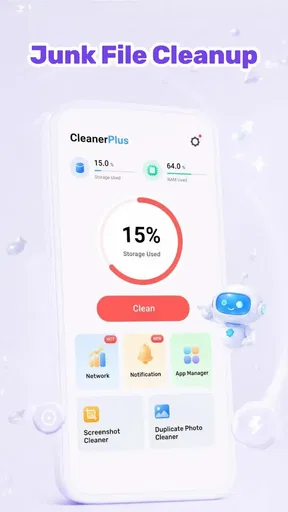
Our Review of CleanerPlus
 Analysis by Appyee
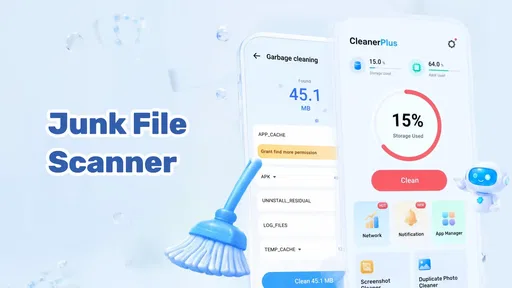
I approached CleanerPlus as a practical tools app rather than a magic “make my phone new again” solution. Its purpose is straightforward: help clean up log files and find duplicate photos. That narrow focus is useful because storage maintenance is easier to trust when an app explains what it is trying to remove instead of throwing every file into one large cleanup button.
In my experience, the value here depends less on dramatic visual changes and more on whether the app helps me make safer decisions. A few duplicate images can be easy to identify, while logs may be unfamiliar and more difficult to judge. That difference matters throughout the review. CleanerPlus can be convenient for routine housekeeping, but I would still treat every deletion screen as a checkpoint rather than assuming every suggested item is disposable.
The app is free, made by Tidal Tech, and sits in the tools category. It has reached over one hundred thousand installs and holds a 3.7 average from nearly three hundred ratings. Those figures suggest that people are using it, but they also make me keep expectations realistic: this is not a universally loved, all-purpose maintenance suite. It is a focused utility that may suit someone who wants a simple cleanup workflow without paying for a larger package.
How CleanerPlus handles cleanup and trust
I find that CleanerPlus is easiest to trust when I treat cleanup as a small, deliberate task rather than a speed fix. Its focus on log files and duplicate photos makes it worth considering for targeted decluttering, while the final choice about what to keep should stay with me. Before using it, I would decide what I want to clear and what I may still need, especially if I am troubleshooting an app.
A focused job is easier to understand
The first thing I like about the concept is its limited scope. CleanerPlus is built around two recognizable chores: clearing log files and dealing with duplicate photos. Many phone-cleaning alternatives combine temporary files, large videos, unused applications, browser traces, notifications, battery tools, and memory claims in the same interface. That can be convenient, but it can also make it harder to understand what a scan is actually recommending.
With this app, the central question is more concrete: do I want to review logs, duplicate pictures, or both? That makes it better suited to a person who already knows what is filling the phone. If my gallery has several copies of the same screenshot after moving between messaging apps, the duplicate-photo side addresses a visible problem. If an app or developer has asked me to clear diagnostic logs, the log-cleaning side may provide a more direct route than searching through folders manually.
I would not install it expecting a complete phone optimization system. Cleaning a small collection of logs will not necessarily make an older phone feel faster, and removing duplicate photos will not solve every storage problem. The app’s strength is organization and review, not a promise of transforming device performance.
What I check before allowing a cleanup
My preferred routine is to scan first, pause, and inspect the results before confirming anything. This is especially important with photos. A duplicate detector can identify files that look alike, but “duplicate” does not always mean “unwanted.” One copy may be edited, cropped, shared at a different quality, or stored in a folder I use for a specific purpose. I keep the version with the best resolution and the one that is easiest to find later.
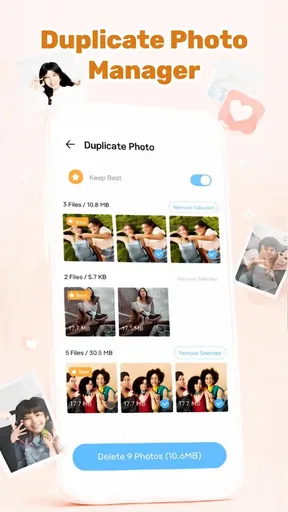
A useful habit is to review groups rather than selecting everything immediately. If CleanerPlus presents several copies of a family picture, I compare the images, check which one has the desired quality, and then remove only the extras. This takes longer than a one-tap cleanup, but it reduces the chance of deleting the version I actually wanted. I also avoid cleaning immediately before a trip or event, when a missing image would be more inconvenient.
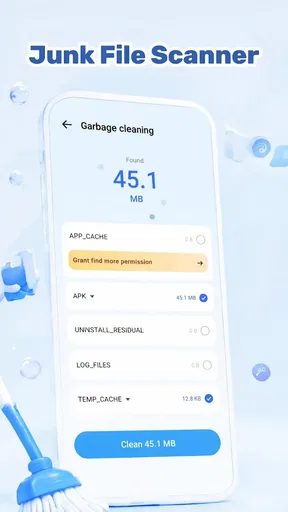
Logs require a different kind of caution. They are usually less meaningful to an everyday user than photographs, so I would not remove them simply because they look technical or occupy space. If I am troubleshooting an app, I may need those records for support or diagnosis. My practical approach is to clean logs only after I have finished investigating a problem, not while the problem is still active.
The everyday scenario where it makes sense
A realistic use case is a phone that has accumulated years of screenshots, forwarded images, and repeated downloads. I might open CleanerPlus before a long journey, scan for duplicate photos, and use the results to reduce clutter without manually opening every album. I would then revisit the gallery and confirm that important originals remain. The benefit is not just recovered space; it is having a more manageable photo library.
Another sensible moment is after moving content between devices. Transfers can leave multiple copies of the same image in separate folders. Rather than browsing the entire storage manually, I can use the duplicate-photo workflow as a first pass, then make the final decision myself. That is a good example of where a focused cleaner can save time without pretending to understand my personal filing system perfectly.
For logs, I see a narrower scenario. If an application has been generating diagnostic files during testing or troubleshooting, I might use the tool after saving anything I need. This is more useful for technically curious users, testers, or people following support instructions than for someone who simply wants a faster phone.
Where it differs from broader cleaner apps
The usual alternative is a larger maintenance app that scans many categories at once. Those products can be more convenient when I want to inspect oversized videos, unused applications, temporary downloads, and other storage-heavy items in one session. They may also offer scheduling or extra device tools, depending on the product. CleanerPlus is more appealing when I do not want that wider set of recommendations.
Manual cleanup is the other alternative. Opening the gallery, searching folders, and deleting repeated images gives me maximum control, but it is slow when the library is large. CleanerPlus can act as a sorting assistant rather than replacing my judgement. That distinction is important: I would use it to narrow the work, not to surrender control over personal files.
Cloud photo services can also identify repeated or unnecessary media as part of a broader backup system. If my main goal is backup, organization, and access across devices, a dedicated photo service may be the better choice. CleanerPlus is more relevant when I want a local cleanup tool focused on the phone itself, not a complete photo-management ecosystem.
Privacy and data-sensitive moments
Duplicate-photo scanning is inherently sensitive because the app needs to work around personal images in some way. That does not automatically make the process unsafe, but it does mean I pay attention to the permission prompts and the choices shown before granting access. I read each request in context, use the narrowest option available on the device, and avoid approving access that does not appear necessary for the task.
The same principle applies to logs. Log files can contain technical details about applications and device activity, so I treat them as potentially sensitive even when they are not personal photographs. Before clearing them, I consider whether they are needed for a support case, a bug report, or a record of what happened. A cleanup app should help me remove files, but it cannot decide whether those files have evidentiary value in my particular situation.
I also look for visible confirmation before destructive actions. My trust increases when a tool shows categories, file groups, or a review step instead of making deletion feel automatic. If a screen is unclear, I stop rather than guessing. That is not a criticism unique to CleanerPlus; it is the correct standard for any app that touches storage.
Because CleanerPlus is rated for Everyone, I would still explain the deletion workflow to a younger or less technical user before letting them run it. An age label does not remove the need for supervision around personal photos and device files. The safest setup is one where the phone owner understands that a cleanup suggestion is only a suggestion.
Controls that affect my confidence
The app’s current version is 1.1.0, and it supports devices running Android 7.0 or later. That broad compatibility is helpful for people using older phones, particularly if newer maintenance tools no longer support their device. At the same time, older Android versions can present different permission screens and storage behavior, so I would pay close attention to what the operating system displays during setup.
I would also check the app’s visible choices before beginning a scan: which area it is examining, whether I can review selected items, and whether the final action clearly identifies deletion. These are practical controls, not decorative details. A cleaner earns trust by making it obvious what will happen next.
When an app handles personal media, I prefer to avoid leaving it with broader access than needed. After finishing a cleanup session, I review the device’s app permissions and remove access if I no longer want the tool to inspect photos or files. That habit gives me more control over when the app can interact with sensitive content.
I would not judge the app’s trustworthiness from its rating alone. The 3.7 average and the presence of fourteen written reviews provide some public feedback, but they do not answer every privacy or usability question. I use them as context, then rely on the app’s actual prompts, explanations, and confirmation screens while making my own decision.
Small workflow choices that make a difference
My first practical tip is to clean in separate sessions. I would handle duplicate photos on one occasion and logs on another. Separating them makes it easier to notice what changed and reduces the chance of approving several unrelated cleanup actions while distracted.
My second tip is to preserve a deliberate “keeper” rule for images. For example, I might retain the copy with the clearest resolution, the correct orientation, or the album location I use most. This avoids the common mistake of keeping the newest file simply because it appears first. The best duplicate-photo workflow is not “delete the extras”; it is “decide which copy has the most value.”
My third tip is to run the tool after organizing, not before, when the gallery is especially messy. Moving important photos into clearly named albums first can make duplicate results easier to interpret. It also gives me a reference point if I later wonder whether an image was removed intentionally.
A fourth useful trade-off is to think about timing. If storage is nearly full, cleanup may be urgent, but urgency is exactly when I am most likely to approve too quickly. I would remove obvious, reviewed duplicates first, then return to less certain groups. Recovering a modest amount safely is better than making a large deletion that creates a new problem.
Who should use it and who should skip it
I can recommend CleanerPlus to someone whose main annoyance is repeated photos and who wants a dedicated tool rather than a broad device-management package. It may also suit owners of older Android phones because its minimum operating-system requirement reaches back to Android 7.0. People who prefer to review suggestions themselves should find the focused purpose easier to manage than an app that offers dozens of unrelated cleanup categories.
I would be more cautious about recommending it to someone who expects automatic maintenance, detailed storage analytics, or a complete backup strategy. It is also not my first choice for a person who has a large professional photo archive and needs advanced cataloging, version control, or reliable cloud workflows. In that situation, a specialist photo manager is likely a better fit.
Users who are uncomfortable reviewing technical files should avoid casually deleting logs. If those files are connected to an ongoing support case, I would leave them alone until the issue is resolved. Likewise, anyone who rarely checks photo selections before deletion should use a more manual approach, because convenience is not worth losing an irreplaceable image.
My final view after weighing convenience against control
CleanerPlus makes sense because it stays close to two practical cleanup tasks instead of trying to be an entire phone-maintenance ecosystem. I appreciate that focus, especially for duplicate photos where a dedicated review process can save time. The free price also lowers the barrier to trying it, while the current 1.1.0 release and support for Android 7.0 or later make it accessible to a wide range of devices.
My recommendation comes with a clear condition: use it as an assistant, not an authority. I would inspect duplicate groups, protect important originals, and treat logs as potentially useful records until I know they are safe to remove. I would also review permissions and visible choices before and after a cleanup session. The strongest reason to use CleanerPlus is controlled decluttering, not blind automation.
For a phone crowded with repeated pictures, it is worth considering. For broad performance tuning, cloud backup, advanced photo organization, or hands-off maintenance, another category of app may serve you better. CleanerPlus earns a place on my shortlist when the problem is specific and I am willing to stay involved in the final decision.
Verdict
Strengths of CleanerPlus
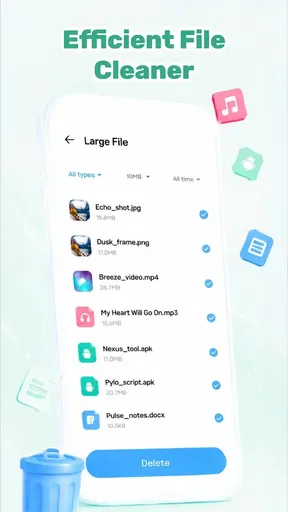
- Quickly identifies large files and duplicate photos.
- Simple interface makes storage cleanup easy for beginners.
- Helps organize cluttered media into manageable categories.
- Useful reminders can encourage regular device maintenance.
- Can free space without requiring advanced technical knowledge.
Limitations of CleanerPlus
- Some cleanup suggestions may require manual checking first.
- Performance can vary depending on device storage size.
- Ads may interrupt the experience in the free version.
- Privacy permissions should be reviewed before scanning personal files.
- Aggressive cleanup could remove files you intended to keep.
Similar Picks in This Category
View All
Google LLC4.0

Gboard - the Google Keyboard
Google LLC4.5

Google Play services
Google LLC4.3

Google Play Store
Google LLC4.9

Files by Google
Google LLC4.5

SHAREit: Transfer, Share Files
Smart Media4U Technology Pte.Ltd.4.3
Frequently Asked Questions
What is CleanerPlus and what does it do?
CleanerPlus is designed to help users manage and optimize storage on an Android or iOS device. Depending on the version available for your platform, it may scan for unnecessary files, duplicate photos, large videos, unused downloads, and other items that can consume space. It can also provide an overview of storage usage, making it easier to decide what should be removed. Always review suggested files before confirming deletion.
Is CleanerPlus safe to use on my phone?
CleanerPlus can be useful for identifying clutter, but users should still treat cleaning applications carefully. The app may request access to photos, files, contacts, or other device data so it can perform its features. Install it only from an official app store, check the developer information and permissions, and read the privacy policy. Before deleting anything, review the selected items because some files may be important.
Can CleanerPlus delete important photos, documents, or personal files?
CleanerPlus should normally display the files it proposes to remove, but no automatic cleaning tool can replace a careful review. Important images, videos, downloads, or documents may sometimes be categorized as duplicates, temporary items, or large files. Check the preview and selection list before tapping the clean button, and create a backup of valuable content using cloud storage or another device before performing a major cleanup.
Does CleanerPlus really improve phone performance or battery life?
CleanerPlus may free storage space and remove unnecessary files, which can make a device feel less crowded and help when storage is nearly full. However, it should not be expected to dramatically increase processing speed or battery life. Modern Android and iOS systems already manage memory and background activity efficiently. The most noticeable benefit is usually improved available storage rather than a permanent performance boost.
Is CleanerPlus free, and are there subscriptions or in-app purchases?
The availability of free tools, premium features, advertisements, and subscription plans can vary according to the CleanerPlus version, operating system, region, and current store listing. Before downloading or starting a trial, carefully check the pricing page and subscription terms. Pay particular attention to automatic renewal, trial periods, and cancellation instructions. Removing the app alone may not cancel an active subscription managed through Google Play or the App Store.
